• Skip to main content
  • Skip to primary sidebar
  • Skip to footer

  • Blog
  • Shop
  • About the Author
  • Start Here
  • Home
  • Categories
    • Crochet
    • Crafts for You
    • Crafts for Kids

on July 16, 2015 · Leave a Comment

Homeschool Planet Review

This post may contain affiliate links. That does not mean you pay any more for items linked here,
it simply means I receive a small amount of money if you make a purchase. Thank you for your support!

If you’ve followed my blog for any amount of time, you know that I am one of the least organized people you know.  I have a hard time keeping track of my daily tasks and schedule.  I keep a calendar for major things, but often minor things get forgotten.  That’s why when I was given the chance to review the homeschool planner, Homeschool Planet, from Homeschool Buyers Co-op, I jumped at the chance.  I needed a way to keep track of what my children were doing in school, as well as my daily tasks.

Homeschool Planet Review
Homeschool Planet is an online homeschool planner.  I received their year-long plan to review.  This plan is $65, but they also have a free 30 day trial that I would encourage you to try out.  Since this planner is online, you’ll also want a good internet connection and a secure computer to use it on.

This planner is more than just a calendar or checklist.  It’s an all-inclusive planner for you to use in every area of your life.  When I first set it up, I set up a profile for my husband, my daughters, and myself.  I ended up using the planner mostly for my daughters homeschool things, but also for some of my daily chores.

Here are just a few features of the Homeschool Planet planner.

  • Daily and weekly email reminders for the parents and older children (I used both the daily and weekly function of this!)
  • Widgets that can be customized to fit your needs.  Some options include shopping list, scripture verses, meal plans, and research.
  • Separate logins for each child so they can access their assignments and to-do lists.  (We didn’t use this function since my kids are so little, but we definitely would in the future!)
  • Calendar view to see everything on your calendar at once (daily, weekly, and monthly settings), and Planner view to see only your tasks to complete.
  • Lesson planning options where you can add assignments, postpone assignments, include instructions for your child, links, and more.
  • An option to carry over lessons that you didn’t complete.  (I LOVE this option!  If you miss a day, you just push “carry forward” and it bumps ALL your lessons for you!  Oh, how I would have loved this when I was a public school teacher!)
  • Grading Helper for those with students older than mine.

I want to share a few of my FAVORITE features of Homeschool Planet with you.  I’m sharing some of their photos since my screenshots would have my children’s names on them.  These screen shots look just like what I see on my screen though.  ðŸ™‚

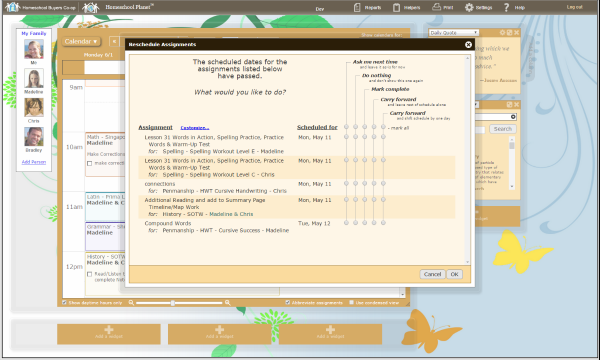
Reschedule Assignments: You can tell I’m not the most organized person since this is one of my favorite parts!  It really does help me to be organized though!  I love being able to bump assignments forward when I need to and I like that there are so many choices for when I do miss marking off an assignment.  It’s a big help!
Homeschool Planet Review
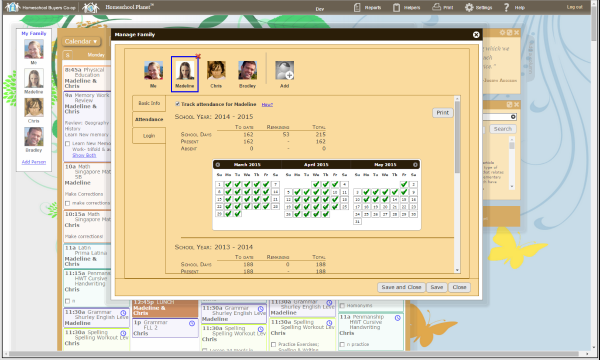
 Planning the School Year and Tracking Attendance: Homeschool Planet gives you the option to plan out your school year.  This is really convenient because if you say you’re taking spring break from April 2nd-6th for example, when you input your assignments, it will automatically skip those weeks.  What a great way to make things easier on homeschool moms!  You can also use Homeschool Planet to track your child’s attendance and hours.  I don’t do this yet since mine are so little, but the ability to do all this in one place would really help with having those reports ready if the state should come to call.

Homeschool Planet Review
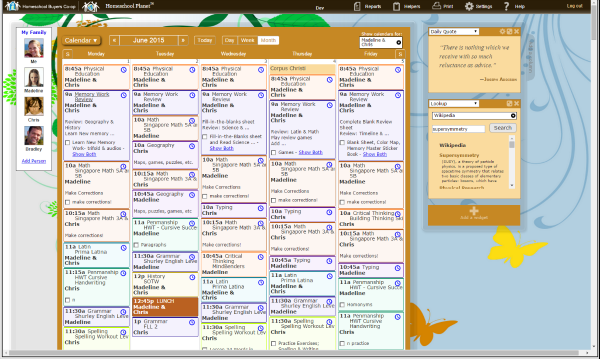
Calendar: This calendar is the best online calendar I’ve seen to date.  You can sync it with your Google Calendar (AMAZING!), it has options when you schedule for things to repeat daily, weekly, monthly on the day, monthly on the date, Monday/Wednesday/Friday, Tuesday/Thursday…almost any combination you could want!  You can also schedule in different colors for different activities, lessons, chores, etc.  The possibilities are endless.

Homeschool Planet Review
Does it seem a little overwhelming?  It did for me too at first.  But Homeschool Planet provides a library of tutorials to guide you through everything in their help section!  This planner is, in my opinion, the best you’ll find for a busy homeschool family.  They don’t have an app yet, but you can view and edit the calendar on the mobile site, so it’s even great for the family on the go!  For more information, you can visit Homeschool Buyers Co-op on Facebook, Twitter, or Google+.

Homeschool Planet Review
 

Crew Disclaimer

Filed Under: Family

Previous Post: « Using Games to Teach Rhyming at Home
Next Post: Utilizing the Library for your Preschool »

Reader Interactions

Leave a Reply Cancel reply

Your email address will not be published. Required fields are marked *

Recipe Rating


This site uses Akismet to reduce spam. Learn how your comment data is processed.

Primary Sidebar

Welcome!

Welcome!

Welcome to Crafty Homeschool Mom! I'm so happy you're here! Kick back, take a look around, and take time to be inspired.

Cart

GET THE LATEST NEWS FROM CRAFTY HOMESCHOOL MOM!

Mini Maker Stitchery Kits
Enjoying your visit?

LET'S HANG OUT ON FACEBOOK

Lets Go!

Footer

Thanks for Visiting!

Disclosure
Privacy Policy
Terms of Use

Latest on Instagram

GET THE LATEST NEWS FROM CANDLE IN THE NIGHT!

slot gacor situs toto slot gacor
  • Home
  • Contact
  • Disclosure
  • Privacy Policy
  • Terms of Use

Copyright © 2026 · Design by Studio Mommy

Copyright © 2026 · Her Exclusive on Genesis Framework · WordPress · Log in

3 shares